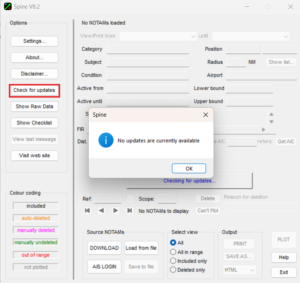
Please note that from November 24th 2024, Shalbourne Gliding has moved its main website to a new hosting service.
We are continuing to host SPINE here on our old portal but we have moved it onto a subdomain so that web traffic for shalbournegliding.co.uk can be routed to our new website.
This means that the address that you have in your downloaded SPINE application which it uses to check for updates will no longer look in the correct location.
You may accordingly see this pop-up window
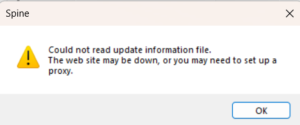
either when the application starts (if you have set it to check for updates on each application startup) or when you manually ask SPINE to check for updates.
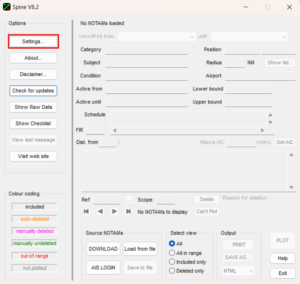
When the application was written, this eventuality was foreseen and a feature was provided to amend the update location. To change the location used to search for updates, open the SPINE application and press the Settings button:
On the settings page, press the Unlock button:
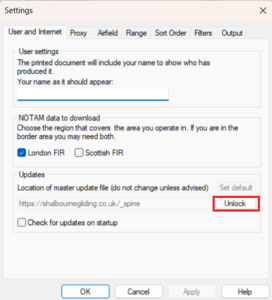
Now you can type in the text box specifying the location – highlight the current location and delete it so the text box is empty
Highlight the following address on this webpage and press CTRL-C to copy the text:
https://wiki.shalbournegliding.co.uk/_spine
Click back into the text box on the SPINE settings page and press CTRL-V to paste the new address into it:
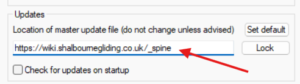
Then click the OK button at the foot of the settings page:
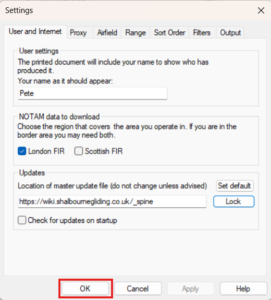
SPINE will now look in the correct location for its updates once more. You can verify correct operation by pressing the Check for updates button on the front page. You will normally get a pop-up window telling you there are no updates but this confirms that SPINE has been able to find the correct update location.